Kondisi Barang : Baru
Harga :
Lokasi Seller : Daerah Istimewa Yogyakarta
Description :
Kumpulan Tips dan Trick Mobile Broadband
[/quote]
Quote:
Thread sebelumnya : http://ceriwis.us/showthread.php?t=1155572
Ditutup karena lama tidak diupdate, dan dilanjutkan di thread ini.
Dikarenakan juga banyak yang bertanya mengenai masalah modem koneksi broadband dan juga permasalahan pada thread sticky modem sierra GPS (TSnya menghilang), oleh karena dari kedua hal tersebut maka akan digabungkan menjadi 1 sticky baru  .
|
Quote:
1.Trick aktivasi dan menggunakan fitur GPS pada modem sierra
|
Quote:
Originally Posted by dewakluster

Buat temen-2 yang kepengen punya GPS gratis di Laptop sekarang bisa pake sierra 881U modem buat jadi GPS receivernya. Ikutin aja cara nya dibawah ini. Tapi sebelomnya, GPS feature di sierra 881U harus di aktif-in dulu. Gimana cara aktif-in nya? tanya aja ke yg jual modem. Gua beli modem sierra 881U dari pusatmodem.com.
1. Pertama-tama download dulu Garmin software dari situs rapid*share. Linknya ada di bawah ini. Pilih salah satu.
Link 1: http://rapid*share.com/files/1607719...mbl5.00.50.zip
Link 2: http://rapid*share.com/files/1607756...lePC_50050.rar
2. Install Main.msi dulu baru Setup.exe
3. Trus Reboot computer bentar
4. Abis itu update Garmin Mobile PC nya ke update versi 5.00.50 yang bisa di-download dari situs Garmin langsung. Linknya ada di bawah ini:
http://www8.garmin.com/support/colle...t=010-00685-00
5. Reboot lagi computer abis process update selesai
6. Trus ikuti petunjuk �unlock guide.txt� atau �readme.txt� untuk aktif-in Garmin Mobile PC
7. Peta GPS wilayah Indonesia v0.66 bisa di-download dari situs navigasi.net
Linknya ada di bawah ini:
http://www.navigasi.net/goclk.php?i=GSAv066u
Setelah selesai men-download [GMAv0.58]navigasi.net.zip, pake WinZip ato WinRAR untuk meng-extract GMAPSUPP.img file yang diperuntukan buat yang ngak punya aplikasi Garmin Map Source.
8. Copy dan paste GMAPSUPP.img file ke dalam GarminMobilePC Installation directory. Contohnya C:\GarminMobilePC atau D:\GarminMobilePC
9. Abis itu download dan upgrade 3G Wacther ke versi GPS. Bisa di-download dari situs Sierra Wireless langsung. Linknya ada di bawah ini:
http://www.sierrawireless.com/resour...Watcher_MP.msi
10. Setelah selesai meng-upgrade 3G Watcher, colok Sierra 881U modem, nyalain 3G watcher. Teken Tools > MP Physical Interface. Pilih option USB.
11. Teken Tools > Display GPS untuk membuka GPS Monitor
12. Tekan tanda Play di tengah untuk mulai nyari satellites. Tunggu aja bentar. Kalo process gagal (Failure), tekan tanda pause trus play lagi buat mengulang process pencarian lagi. Kalo udah sukses bakal keliatan �Got position fix at � ( x satellites).
13. Kalo udah sukses dapetin satellites, nyalain Garmin Mobile PC. Mobile PC bakal otomatis connect ke sierra 881U modem.
14. Kelar deh, boleh dicobain deh muter-2 pake boil sambil pamer-2in ke temen-2.

PS:
Thank you buat bos Jun buat modemnya, dapet murah banget 2 minggu lalu di 750 rebu... Thank you berat juga buat bos Iqbal dari sierra.web.id yg udah ngebantu cara setup GPS pake Garmin. Hehehe, boss jangan lupa yah kalo mau jual sony vaio nya... keren bener tuh

[FLASH]http://www.youtube.com/v/yQ4T8ExhOxQ&hl=en&fs=1%5b/flash%5d[/FLASH]
BACA BUAT YANG PAKE SIERRA 881 PCMCIA !!!
Kalo pake sierra 881 PCMCIA jangan pilih USB di MP Interface. Caranya, pertama, buka Device Manager dulu (Right Click di My Computer, trus pilih Properties, Click Hardware > Device Manager) trus ke bagian port. Liat COM port no berapa buat DM ato AT Command. Catet no COM port nya, pilih salah satu aja. Trus balik ke MP Interface di 3G Watcher, pilih Serial Port, sama pilih COM port nya DM ato AT Command. Jangan pilih NMEA port yah. Itu bakal dipake sama Garmin Mobile PC. Bisa conflict nanti kalo dipake juga di 3G Watcher.
Kesimpulan:
Sierra 881U pilih USB di MP Interface
Sierra 881 PCMCIA pilih Serial Port di MP Interface, masukin COM port buat DM ato AT Command
COM Port buat NMEA jangan dipake karena bakal dipake sama Garmin Mobile PC.
BACA BUAT YANG SIERRA 881U MODEMNYA BELOM DIUPDATE KE 7.2
1. Pertama, buka Device Manager dulu (Right Click di My Computer, trus pilih Properties, Click Hardware > Device Manager) trus ke bagian port. Liat AT Command nya pake COM port no berapa. Catet nih nomor COM port buat AT Command. Contoh di sini pake COM12.
2. Trus buka Hyperterminal (Start > All Programs > Accessories > Communications > Hyper Terminal. Bikin session baru. Pilih Connect Using COM port yg tadi lu catet. Click OK, OK.
3. Connect ke modem
4. Ketik ATI0 (kosong bukan huruf O) buat test connection
5. Ketik
AT!HSDCAT=8 (buat nge-set ke 7.2mb/s download, defaultnya =6=3.6mb/s)
AT!HSUCAT=5 (buat nge-set ke 2mb/s upload, defaultnya =3=1.4mb/s)
6. Kalo mau ngecheck dulu value sebelumnya, tinggal ketik:
AT!HSDCAT?
ato
AT!HSUCAT?
7. Tutup Hyper Terminal session
8. Test deh modemnya, bakal support 7.2 deh kalo providenya support 7.2


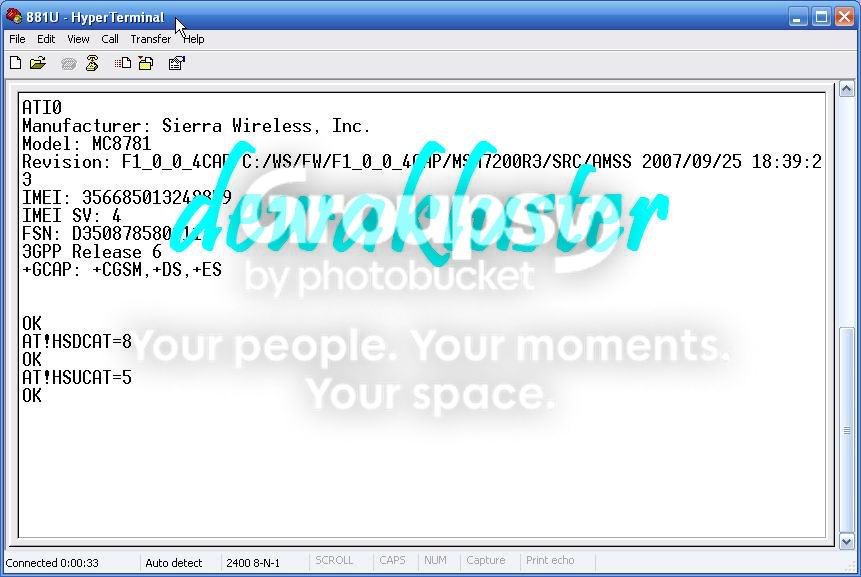
NOTE: Ini cara bisa dipake buat Sierra 881U USB modem sama Sierra 881 PCMCIA Aircard. Nggak bisa dipake buat 875U.
BUAT YANG PAKE WINDOWS VISTA, KARENA NGGAK ADA HYPER TERMINAL, JADI PAKE PUTTY AJA DEH
1. Download putty.exe dari link ini:
http://the.earth.li/~sgtatham/putty/.../x86/putty.exe
2. Run putty.exe
3. Pilih Connection Type Serial, Masukin Serial line nomor COM Port nya AT Commond,
contoh di atas COM12
4. Click Open
5. Ketik ATI0 (kosong bukan huruf O) buat test connection
AT!HSDCAT=8 (buat nge-set ke 7.2mb/s download, defaultnya =6=3.6mb/s)
AT!HSUCAT=5 (buat nge-set ke 2mb/s upload, defaultnya =3=1.4mb/s)
6. Kalo mau ngecheck dulu value sebelumnya, tinggal ketik:
AT!HSDCAT?
ato
AT!HSUCAT?
7. Tutup Putty session
8. Test deh modemnya, bakal support 7.2 deh kalo providenya support 7.2


BACA BUAT YANG BIASA PAKE ADVANCED SETTING DI 3G WATCHER PROFILE BUAT NGESET TCP/IP ATO DNS SETTING, BIASANYA DIPAKE BUAT im2 BROOM UNLIMITED
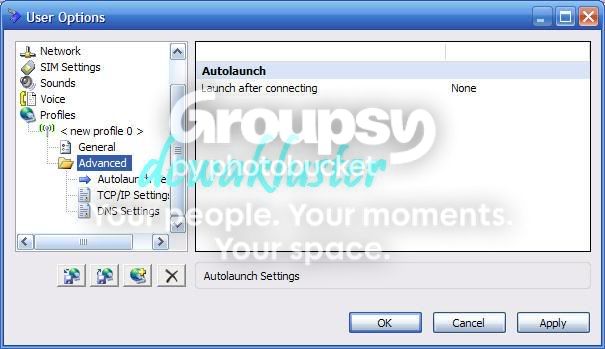
Bisa nge-download option.xml dari 3G Watcher yg non GPS dari link di bawah ini:
http://rapid*share.com/files/161031162/options.xml
Trus tinggal copy and replace file option.xml di folder C:\Program Files\Sierra Wireless Inc\3G Watcher
Thank you bro Torong buat tips nya.
garmin di indo*web*ster..
|
[quote]
menggunakan software safely remove bertujuan mengeject invisble USB pada windows.
Code:
http://www27.indo*web*ster...com/8ef...e50e0caffa.rar
Safely Remove is a system tool developed to help you quick and safely stop the USB Flash Drives connected to your computer.
Allows to view, edit and stop(remove) connected USB Flash Drives. Offers support for keyboard shortcuts and system-wide hotkeys.
Safely Remove completely replaces the features of the standard Safely Remove Hardware icon and also implements a number of unique features.
Convenient user interface: toolbar with familiar MSOffice-like buttons, statusbar, right-click popup menu.
Allows to define sounds on USB Flash Drive StopLoad events. Allows to hide Windows USB hotplug manager.
Here are some key features of "Safely Remove":
� Safely remove in one click!
� Displaying processes which are preventing USB device from being stopped
� Powerful command line support
� 3 methods to stop devices.
� Automatically assigning hotkeys.
� Forbidding stopping any device.
� Customizable names and descriptions for devices.
� Notifications about connecting/disconnecting devices with the help of a balloon tooltip.
� Playing sounds or running external programs when devices are connecteddisconnected.
� Restricting access to the features of the program with a password.
� Loading custom images for devices
� Ability to operate SATA drives


 23rd May 2012
 Kumpulan Tips dan Trick Mobile Broadband

 Terkait


